SOC analyst workflow
Export IOCs to STIX 2.1 and MISP
Select a ThreatFilter indicator window, export STIX or MISP JSON, and review counts, timestamps, sharing and detection settings before import.
ThreatFilter's IOC tool can download the indicators in its selected master view as a STIX 2.1 bundle or a MISP event. Both are investigation candidates. An export does not validate an indicator, create a detection rule or prove compatibility with every receiving platform.
1. Select a small, relevant indicator window
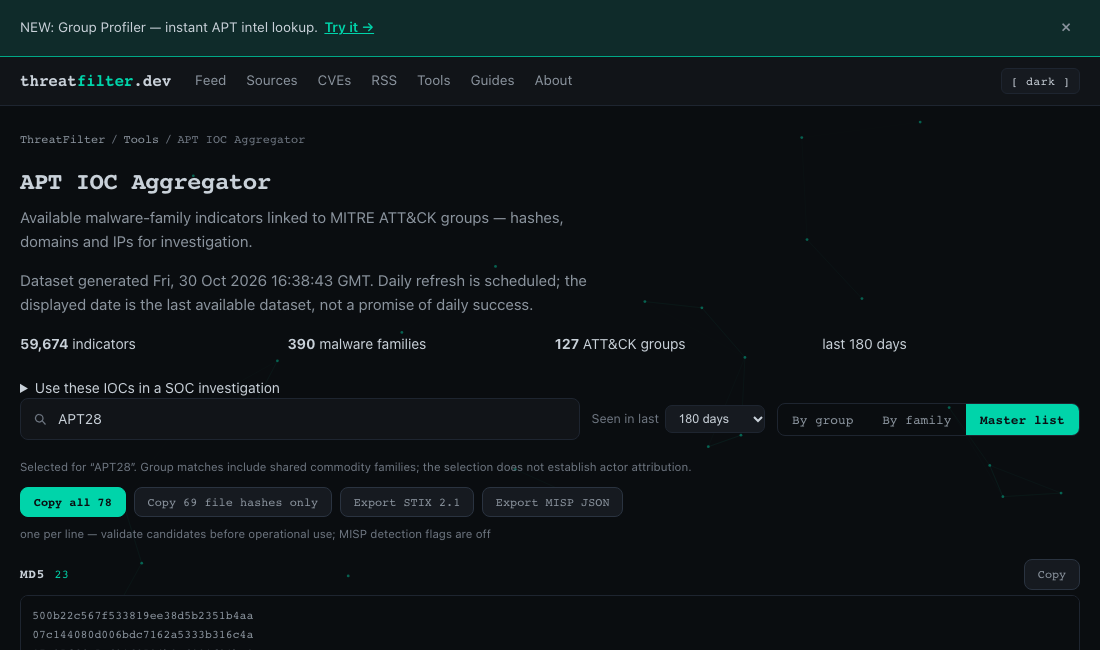
- Open the IOC Aggregator and note the dataset generation time and coverage.
- Use the search and time-window controls to select a group, family or indicator context relevant to your investigation. For an interface walkthrough, search for
APT28; this is a navigation example, not a claim that your environment is affected. - Choose Master list. Review the values and counts by type. The export uses this selection; it is not an export of every record in the site or every indicator associated with the actor. Group searches also include their shared commodity families; that association does not establish attribution.
- Choose Export STIX 2.1 or Export MISP JSON. The file is generated in the browser. Keep a note of the search, selected window and dataset date with the file.
2. Choose the format your receiving system supports
STIX 2.1 bundle
The downloaded JSON has type: "bundle" and an objects array of indicator objects. Each exported value becomes one typed equality pattern. For example, a reserved demonstration domain would use [domain-name:value = 'download.example.invalid'].
The export's created, modified and valid_from values reflect export time. They are not source observation dates or proof of present malicious activity. The bundle is a file, not a TAXII server, and it does not contain a complete graph of actor relationships or sightings.
MISP event JSON
The file contains an Event with an Attribute array. The event is exported unpublished with organisation-only distribution, and attributes have to_ids: false so they start as candidates for review. Their distribution inherits from the event. An IP uses the export's ip-dst mapping; confirm that direction makes sense for your actual observation.
Review local import settings: your MISP installation, synchronisation rules or receiving integration can change sharing and detection behaviour. The file's defaults do not override your platform's policy.
3. Review the file before importing or sharing
- Confirm the indicator count matches the selected master list. Check a sample from each exported type against the displayed value, including hash algorithms and IPv4 versus IPv6.
- Validate syntax and import a small sample into an approved test workspace first. Successful JSON parsing alone does not prove STIX semantic validity or destination compatibility.
- Check timestamps, duplicate handling and any transformations. New UUIDs are generated on each export; repeated imports can create duplicates depending on the receiver.
- Confirm the event remains private and unpublished and detection use remains off until reviewed. Use IOC validation to decide which candidates deserve promotion.
- Keep the source references and your provenance notes alongside the import. Check the original providers' reuse terms and your sharing policy before redistribution; an export is not a new licence.
What the export does not preserve
The master list deduplicates selected values. Its per-indicator export does not preserve a complete source history, all family-to-actor associations, original first-seen dates, confidence scoring, sighting counts or expiration policy. Record these separately when they matter. Never infer confidence from the file format, the actor search or the number of exported indicators.
Use the import checklist to record the selection and review result. If no values match, broaden the selection or check the coverage note; an empty view is not evidence that no malicious activity exists.
Primary format references
- OASIS STIX 2.1 specification: bundle, indicator, pattern and timestamp semantics.
- MISP data models: event and attribute structure, sharing distribution and detection-use fields.